MetaZero
View, remove and edit hidden metadata.
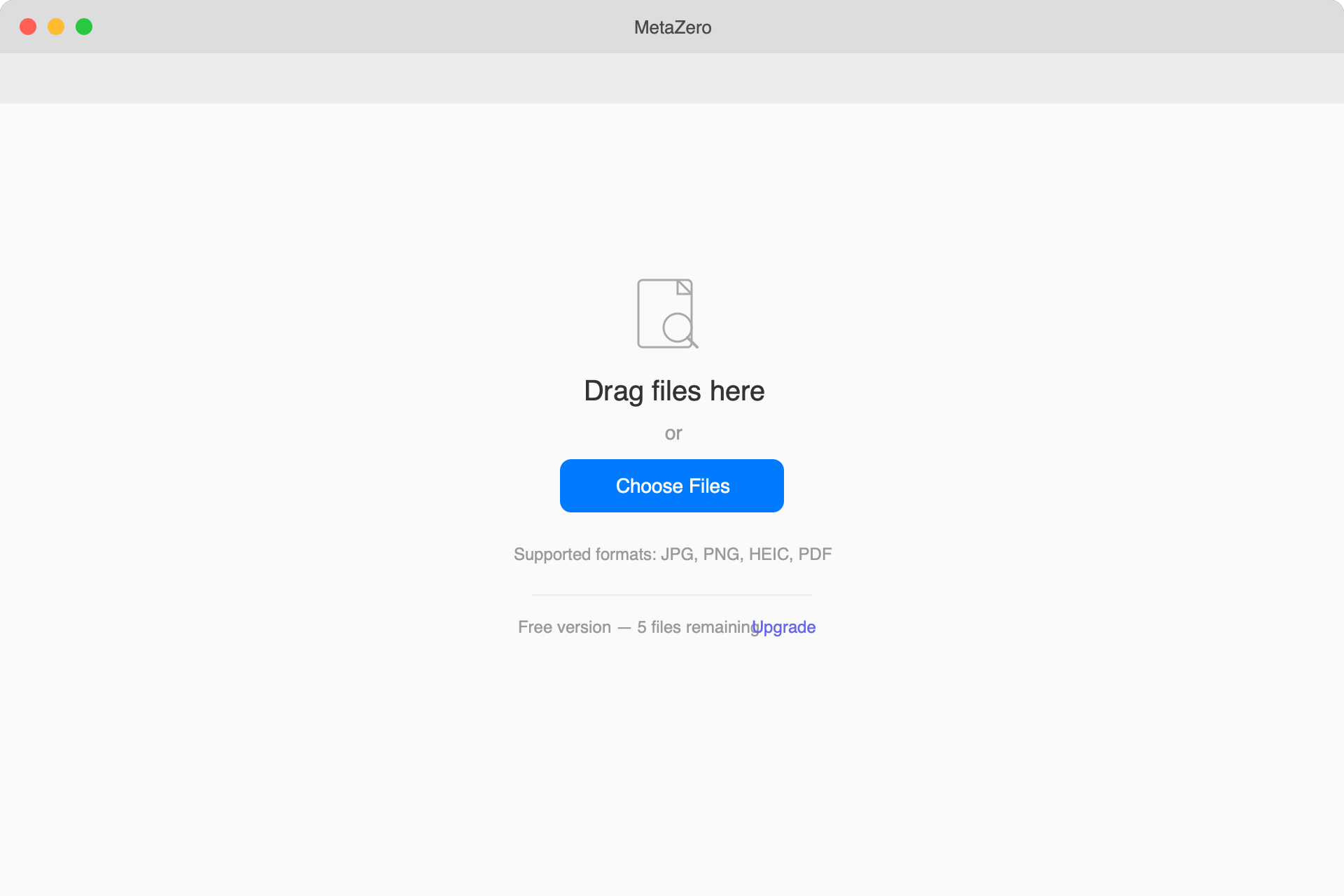
MetaZero lets you inspect, remove, and edit metadata hidden in your images and PDFs — all locally on your Mac. See GPS coordinates, camera info, author details, and software tags. Strip them before sharing with one click. No cloud uploads, no subscriptions, no bloat.
Version 1.1.0 · macOS 13.0+ · June 22, 2026
Lifetime license
2 Macs · one-time
- Lifetime license on up to 2 Macs
- Free updates forever
- 30-day money-back guarantee
- No account required
- macOS Ventura 13.0+
30-day money-back guarantee
Unlock every ZeroApps app — now and all future releases. 10 apps included.
See it in action.
Free vs Paid
Try it free. Unlock everything with a one-time license.
Everything you need, nothing you don't.
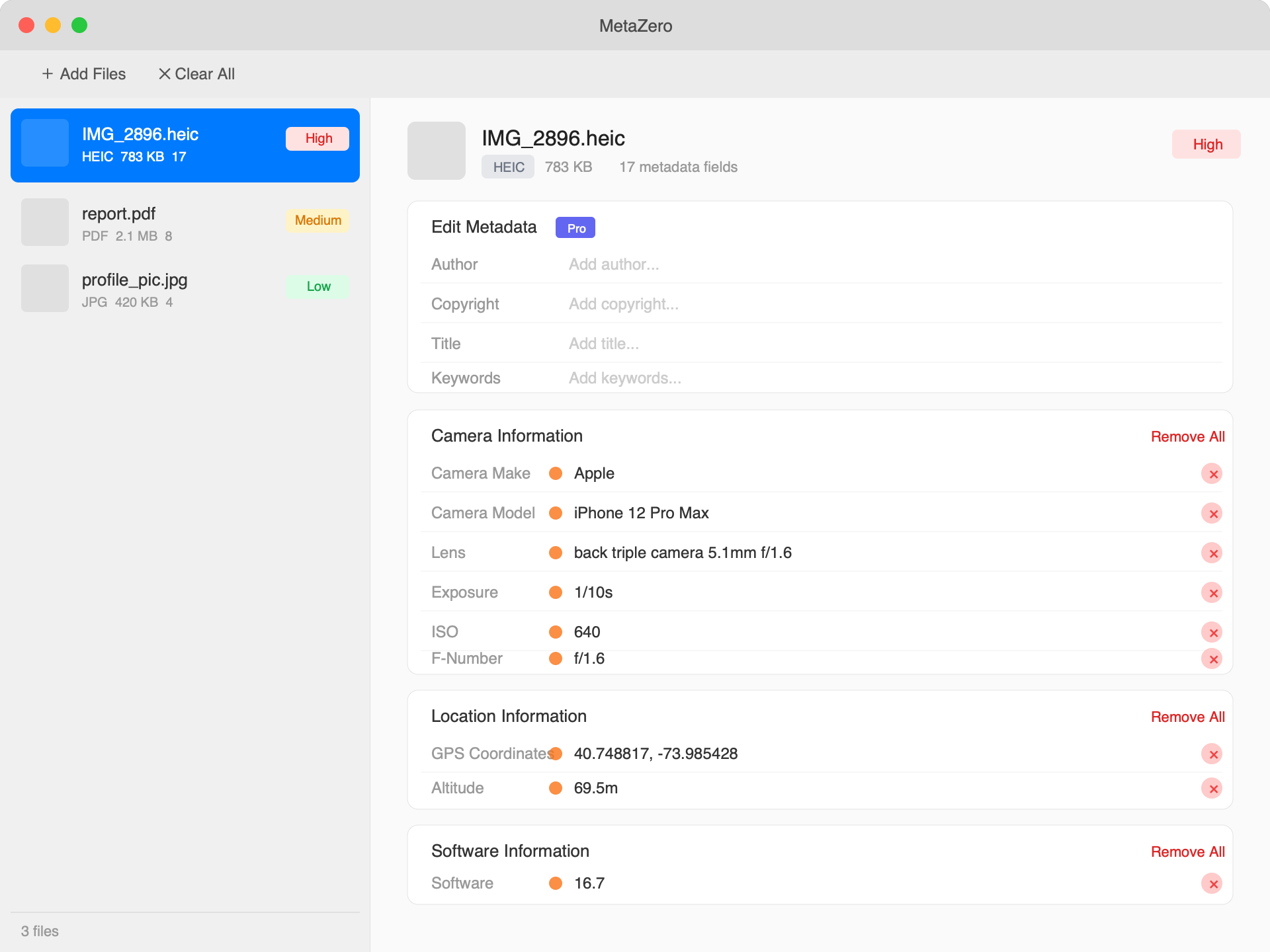
View all metadata
See every hidden detail — GPS coordinates, camera make and model, author, copyright, software, and more. Organised into clear categories with privacy risk indicators.
Remove metadata
Strip GPS location, camera info, author details, software tags, and copyright — selectively or all at once. Preview exactly what will be removed before exporting.
Edit metadata
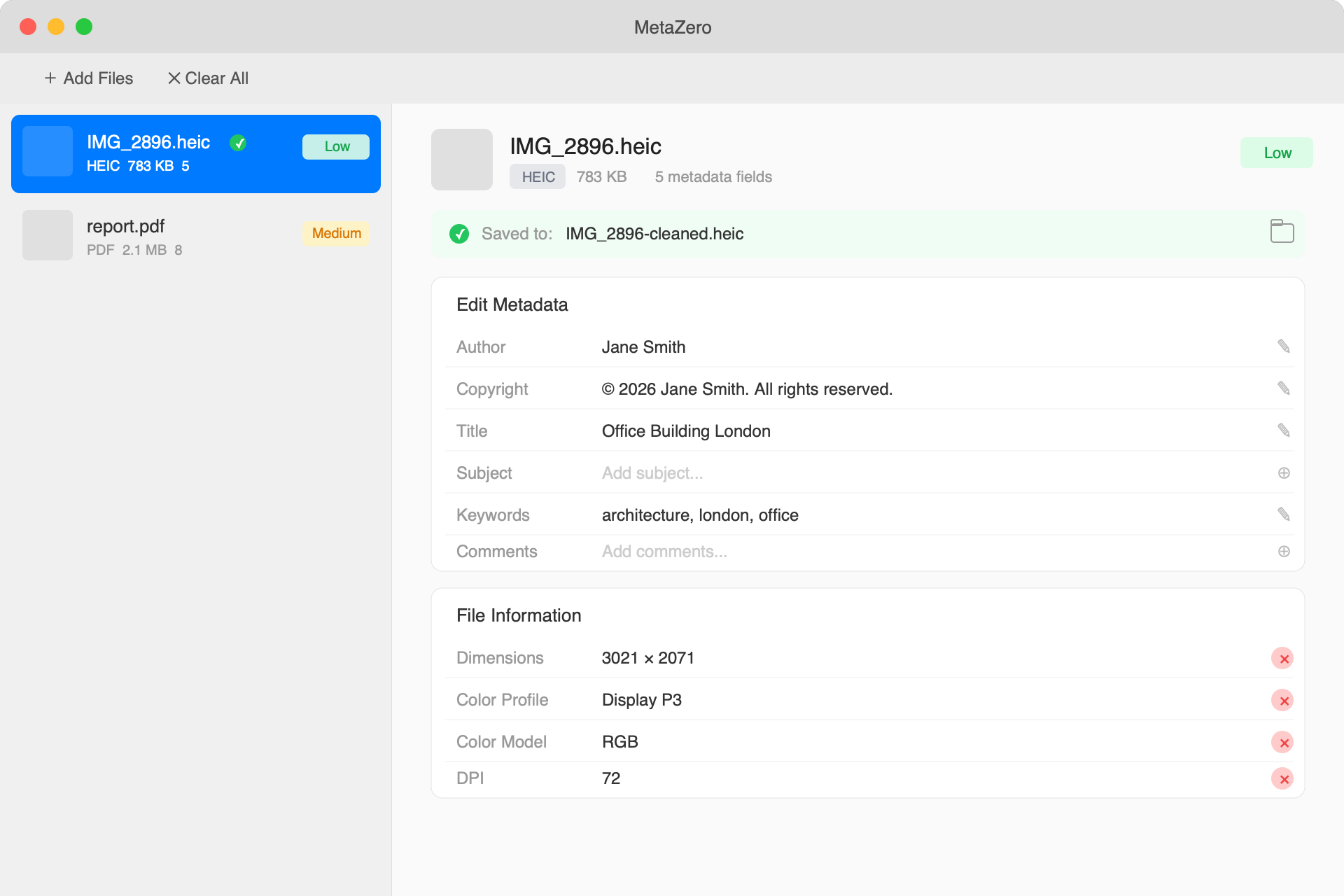
Update author, copyright, title, subject, and keywords directly. Edit in place and export with your changes applied.
Batch processing
Drop in multiple files, apply the same removal settings to all, and export in one click. Process images and PDFs together.
Zero uploads, ever
Every operation runs 100% on your Mac. Not a single byte of your files touches the internet.
Pay once, yours forever
No subscriptions. One-time purchase with free updates for life. Try free with up to 5 files before you buy.
Release history
MetaZero 1.1.0 # New Features - Inline metadata editing — edit Author, Copyright, Title, Subject, Keywords, and Comments directly in the metadata view with Save/Cancel buttons - Inline field removal…
MetaZero 1.0.0 First release of MetaZero — view, remove, and edit hidden metadata in your images and PDFs. # Features - View metadata: EXIF, TIFF, GPS, IPTC, and PDF attributes - Privacy risk indic…
Common questions
What can I do for free?
View and remove metadata from up to 5 files per session. Activate a license to unlock unlimited files, batch processing, and metadata editing.
What can I do for free?
View and remove metadata from up to 5 files per session. Activate a license to unlock unlimited files, batch processing, and metadata editing.
What can I do for free?
View and remove metadata from up to 5 files per session. Activate a license to unlock unlimited files, batch processing, and metadata editing.
What can I do for free?
View and remove metadata from up to 5 files per session. Activate a license to unlock unlimited files, batch processing, and metadata editing.
What can I do for free?
View and remove metadata from up to 5 files per session. Activate a license to unlock unlimited files, batch processing, and metadata editing.
What can I do for free?
View all metadata, remove any field or category, and save cleaned files — up to 5 files per session. Editing and adding metadata fields requires a Pro license. No account or credit card needed to download.
What can I do for free?
View and remove metadata from up to 5 files per session. Activate a license to unlock unlimited files, batch processing, and metadata editing.
Does MetaZero upload my files?
Never. All metadata reading, removal, and editing happens entirely on your Mac. The only network request is license validation, which sends your license key — never your files.
Does MetaZero upload my files?
Never. All metadata reading, removal, and editing happens entirely on your Mac. The only network request is license validation, which sends your license key — never your files.
Does MetaZero upload my files?
Never. All metadata reading, removal, and editing happens entirely on your Mac. The only network request is license validation, which sends your license key — never your files.
Does MetaZero upload my files?
Never. All metadata reading, removal, and editing happens entirely on your Mac. The only network request is license validation, which sends your license key — never your files.
Does MetaZero upload my files?
Never. All metadata reading, removal, and editing happens entirely on your Mac. The only network request is license validation, which sends your license key — never your files.
Does MetaZero upload my files?
Never. All metadata reading, removal, and editing happens entirely on your Mac. The only network request is license validation, which sends your license key — never your files.
Does MetaZero upload my files?
Never. All metadata reading, removal, and editing happens entirely on your Mac. The only network request is license validation, which sends your license key — never your files.
What file types does MetaZero support?
JPG, JPEG, PNG, HEIC images and PDF documents. MetaZero reads EXIF, TIFF, GPS, IPTC, and PDF document attributes.
What file types does MetaZero support?
JPG, JPEG, PNG, HEIC images and PDF documents. MetaZero reads EXIF, TIFF, GPS, IPTC, and PDF document attributes.
What file types does MetaZero support?
JPG, JPEG, PNG, HEIC images and PDF documents. MetaZero reads EXIF, TIFF, GPS, IPTC, and PDF document attributes.
What file types does MetaZero support?
JPG, JPEG, PNG, HEIC images and PDF documents. MetaZero reads EXIF, TIFF, GPS, IPTC, and PDF document attributes.
What file types does MetaZero support?
JPG, JPEG, PNG, HEIC images and PDF documents. MetaZero reads EXIF, TIFF, GPS, IPTC, and PDF document attributes.
What file types does MetaZero support?
JPG, JPEG, PNG, HEIC images and PDF documents. MetaZero reads EXIF, TIFF, GPS, IPTC, and PDF document attributes.
What file types does MetaZero support?
JPG, JPEG, PNG, HEIC images and PDF documents. MetaZero reads EXIF, TIFF, GPS, IPTC metadata from images and all standard PDF document attributes including title, author, subject, keywords, creator, and producer.
Will MetaZero modify my original files?
Never. MetaZero always creates a new cleaned copy. Your original files are never touched or modified.
Will MetaZero modify my original files?
Never. MetaZero always creates a new cleaned copy. Your original files are never touched or modified.
Will MetaZero modify my original files?
Never. MetaZero always creates a new cleaned copy. Your original files are never touched or modified.
Will MetaZero modify my original files?
Never. MetaZero always creates a new cleaned copy. Your original files are never touched or modified.
Will MetaZero modify my original files?
Never. MetaZero always saves changes to a new file (e.g. photo-cleaned.heic) in the location you choose. Your original files are never touched or modified.
Will MetaZero modify my original files?
Never. MetaZero always creates a new cleaned copy. Your original files are never touched or modified.
Will MetaZero modify my original files?
Never. MetaZero always creates a new cleaned copy. Your original files are never touched or modified.
What metadata can I edit?
With a Pro license you can edit or add: Author, Copyright, Title, Subject, Keywords, and Comments. Camera settings, GPS coordinates, and other technical fields can be viewed and removed but not edited.
Why should I remove metadata?
Photos from your phone contain GPS coordinates that reveal where you were, camera serial numbers, and sometimes your name. PDFs include author names, software used, and creation timestamps. Removing this data before sharing protects your privacy.