All apps
ImageZero
Live

ImageZero

Resize, convert and compress images in seconds.

ImageZero resizes, converts, and compresses images — all locally on your Mac. Drop in JPG, PNG, HEIC, or WebP files, toggle on the operations you need, and export. No cloud uploads, no subscriptions, no bloat. Just fast, private image tools that work.

Version 1.0.0 · macOS 13.0+ · June 21, 2026

Lifetime license

$10

2 Macs · one-time

  • Lifetime license on up to 2 Macs
  • Free updates forever
  • 30-day money-back guarantee
  • No account required
  • macOS Ventura 13.0+

30-day money-back guarantee

Save with ZeroPass$29.99one-time

Unlock every ZeroApps app — now and all future releases. 10 apps included.

See it in action.

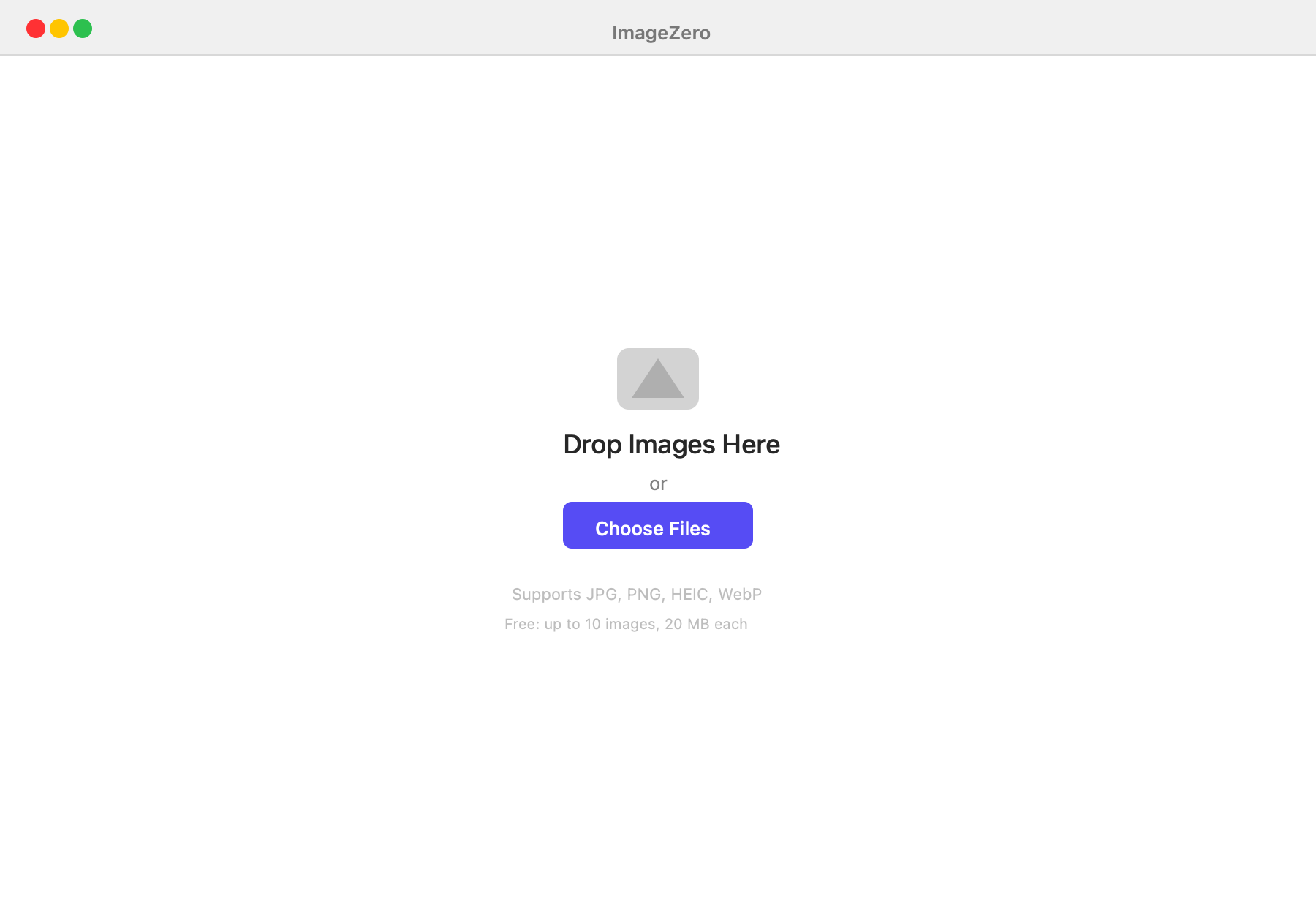
Drag and drop images into ImageZero
Drag and drop images into ImageZero

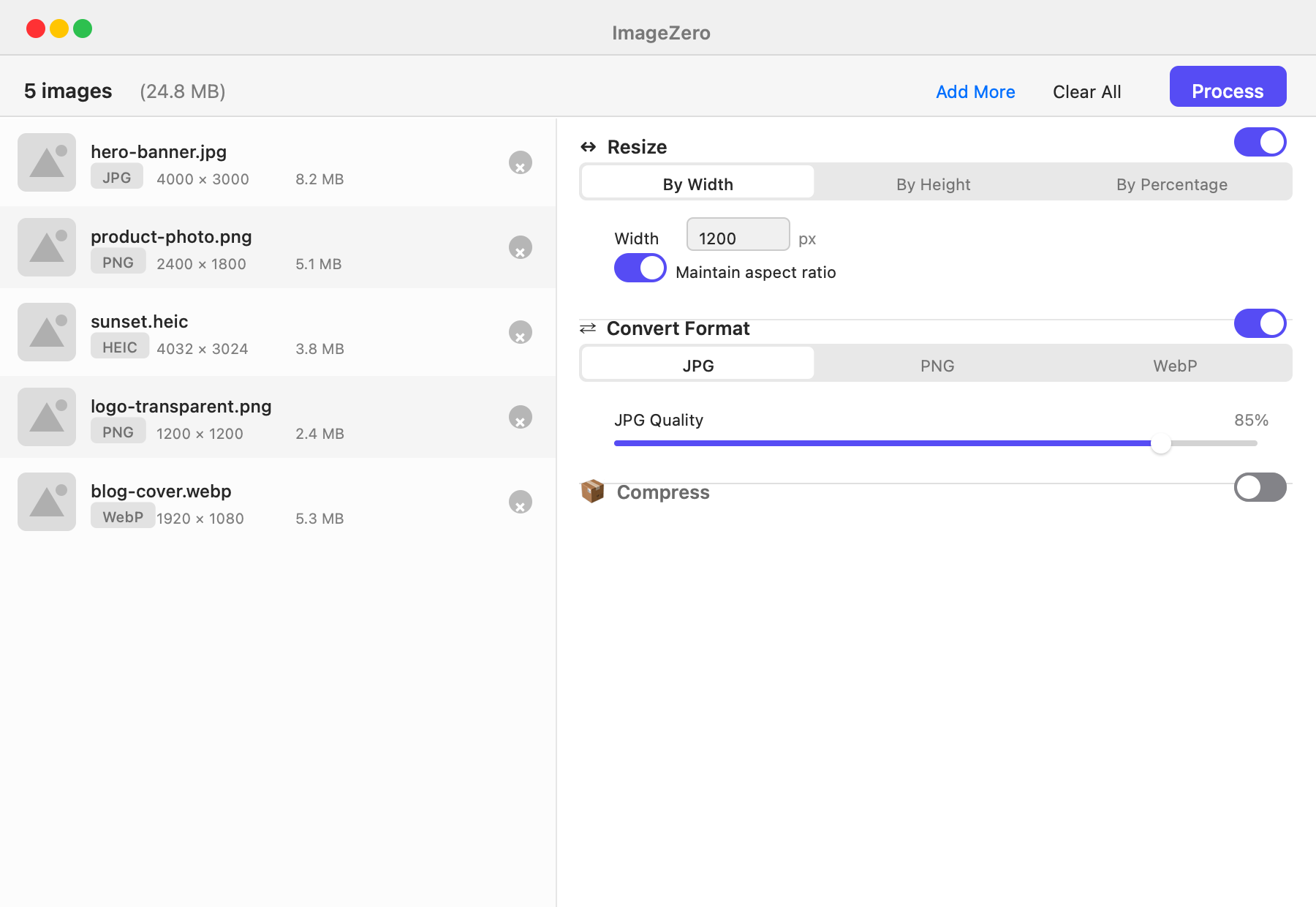
Resize, convert and compress settings in one view
Resize, convert and compress settings in one view

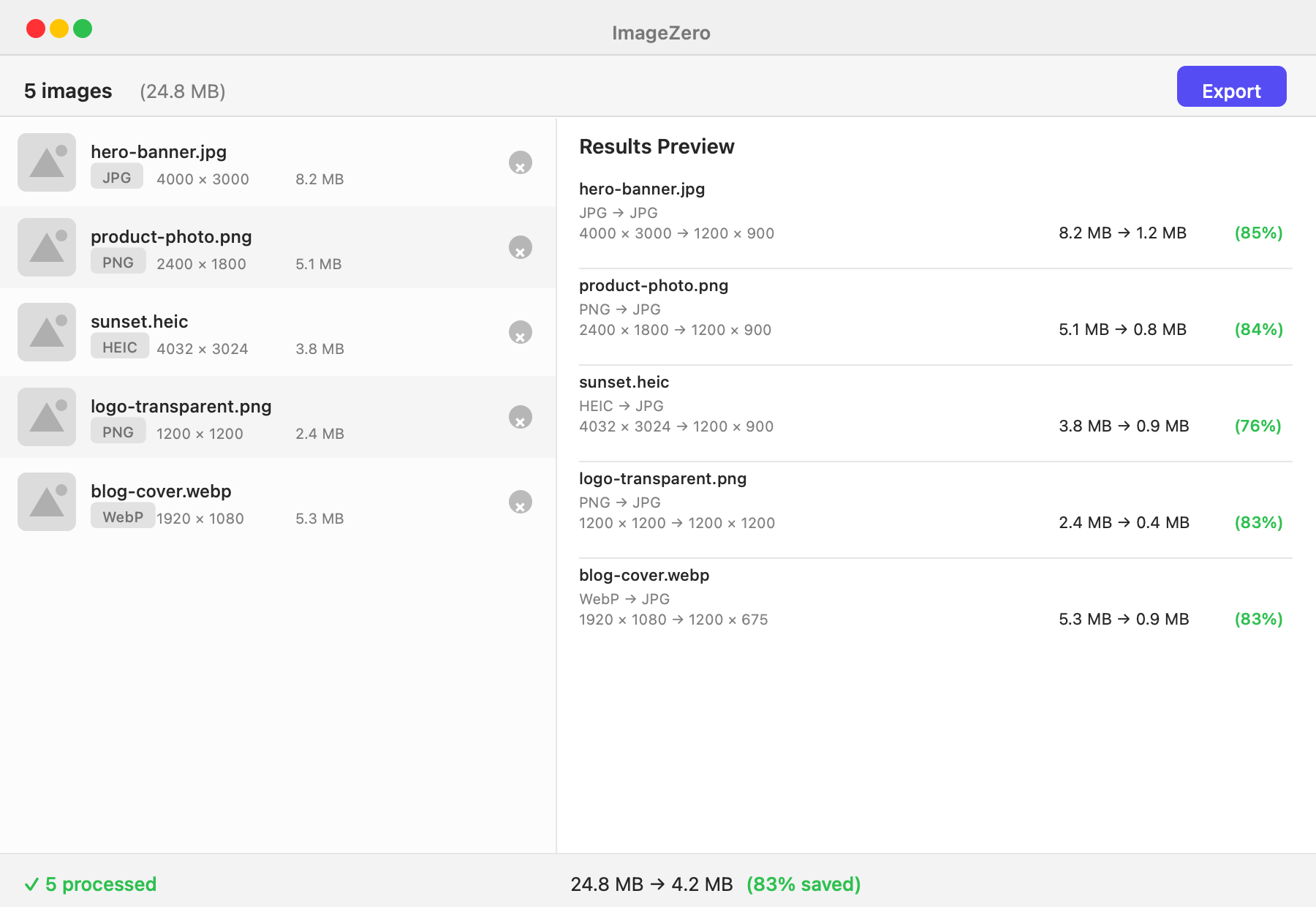
Results preview showing file size savings
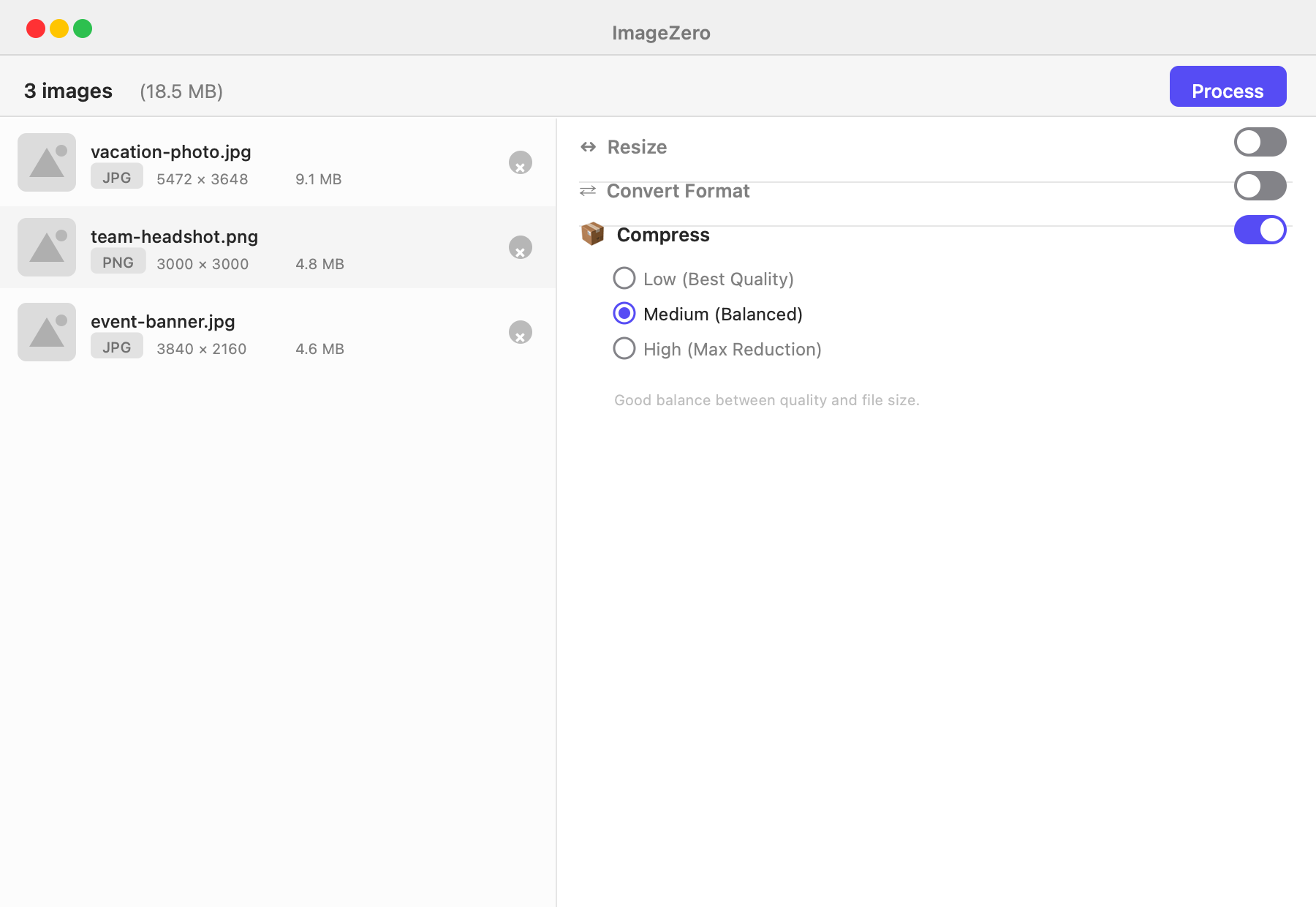
Results preview showing file size savings

Compress-only mode with quality presets

Compress-only mode with quality presets

Free vs Paid

Try it free. Unlock everything with a one-time license.

Free
Paid
Resize images
Convert formats
Compress images
Batch processing
Up to 10 images
Unlimited
Max file size
20 MB per image
Unlimited
JPG quality control
Drag & drop import
Before/after preview
Custom export naming
HEIC & WebP input
Local processing
Lifetime updates

Everything you need, nothing you don't.

Resize images

Resize by width, height, or percentage. Maintain aspect ratio or set custom dimensions. Process one or hundreds at once.

Convert formats

Convert between JPG, PNG, HEIC, and WebP. Adjust JPG quality from 10% to 100%. Drop in any supported format, get the one you need.

Smart compression

Three compression levels — Low, Medium, High. See estimated savings before you export. Reduce file sizes by up to 80%.

Batch processing

Drop in multiple images, apply the same settings to all, and export in one click. Progress bar and cancel for large batches.

Zero uploads, ever

Every operation runs 100% on your Mac. Not a single byte of your images touches the internet.

Pay once, yours forever

No subscriptions. One-time purchase with free updates for life. Try free with up to 10 images before you buy.

Release history

v1.0.0
stable
June 21, 2026

ImageZero 1.0.0 The first release of ImageZero — resize, convert and compress images in seconds. # Features - Resize images — by width, height, or percentage with aspect ratio control - Convert for…

Download 1.0.0 (1.1 MB)
Full changelog

Common questions

What can I do for free?

All three tools — resize, convert, and compress — are fully available for free. Free users can process up to 10 images per session with a 20 MB per-image limit. Activate a license for unlimited use.

What can I do for free?

All three tools — resize, convert, and compress — are fully available for free. Free users can process up to 10 images per session with a 20 MB per-image limit. Activate a license for unlimited use.

What can I do for free?

All three tools — resize, convert, and compress — are fully available for free. Free users can process up to 10 images per session with a 20 MB per-image limit. Activate a license for unlimited use.

What can I do for free?

All three tools — resize, convert, and compress — are fully available for free. Free users can process up to 10 images per session with a 20 MB per-image limit. Activate a license for unlimited use.

What can I do for free?

All three tools — resize, convert, and compress — are fully available for free. Free users can process up to 10 images per session with a 20 MB per-image limit. Activate a license for unlimited use.

What can I do for free?

All three tools — resize, convert, and compress — are fully available for free. Free users can process up to 10 images per session with a 20 MB per-image limit. Activate a license for unlimited use.

What can I do for free?

All three tools — resize, convert, and compress — are fully available for free. Free users can process up to 10 images per session with a 20 MB per-image limit. Activate a license for unlimited use.

What can I do for free?

All three tools — resize, convert, and compress — are fully available for free. Free users can process up to 10 images per session with a 20 MB per-image limit. Activate a license for unlimited use.

Does ImageZero upload my images?

Never. All image processing happens entirely on your Mac. The only network request is license validation, which sends your license key — never your images.

Does ImageZero upload my images?

Never. All image processing happens entirely on your Mac. The only network request is license validation, which sends your license key — never your images.

Does ImageZero upload my images?

Never. All image processing happens entirely on your Mac. The only network request is license validation, which sends your license key — never your images.

Does ImageZero upload my images?

Never. All image processing happens entirely on your Mac. The only network request is license validation, which sends your license key — never your images.

Does ImageZero upload my images?

Never. All image processing happens entirely on your Mac. The only network request is license validation, which sends your license key — never your images.

Does ImageZero upload my images?

Never. All image processing happens entirely on your Mac. The only network request is license validation, which sends your license key — never your images.

Does ImageZero upload my images?

Never. All image processing happens entirely on your Mac. The only network request is license validation, which sends your license key — never your images.

Does ImageZero upload my images?

Never. All image processing happens entirely on your Mac. The only network request is license validation, which sends your license key — never your images.

What formats does ImageZero support?

Input: JPG, JPEG, PNG, HEIC, and WebP. Output: JPG and PNG (WebP output also available). You can mix input formats in a single batch.

What formats does ImageZero support?

Input: JPG, JPEG, PNG, HEIC, and WebP. Output: JPG and PNG (WebP output also available). You can mix input formats in a single batch.

What formats does ImageZero support?

Input: JPG, JPEG, PNG, HEIC, and WebP. Output: JPG and PNG (WebP output also available). You can mix input formats in a single batch.

What formats does ImageZero support?

Input: JPG, JPEG, PNG, HEIC, and WebP. Output: JPG and PNG (WebP output also available). You can mix input formats in a single batch.

What formats does ImageZero support?

Input: JPG, JPEG, PNG, HEIC, and WebP. Output: JPG and PNG (WebP output also available). You can mix input formats in a single batch.

What formats does ImageZero support?

Input: JPG, JPEG, PNG, HEIC, and WebP. Output: JPG and PNG (WebP output also available). You can mix input formats in a single batch.

What formats does ImageZero support?

Input: JPG, JPEG, PNG, HEIC, and WebP. Output: JPG and PNG (WebP output also available). You can mix input formats in a single batch.

What formats does ImageZero support?

Input: JPG, JPEG, PNG, HEIC, and WebP. Output: JPG and PNG (WebP output also available). You can mix input formats in a single batch.

Can I resize, convert, and compress at the same time?

Yes. Toggle on any combination of the three operations and ImageZero applies them all in one pass. You can also leave any operation off to keep the original size, format, or quality.

Can I resize, convert, and compress at the same time?

Yes. Toggle on any combination of the three operations and ImageZero applies them all in one pass. You can also leave any operation off to keep the original size, format, or quality.

Can I resize, convert, and compress at the same time?

Yes. Toggle on any combination of the three operations and ImageZero applies them all in one pass. You can also leave any operation off to keep the original size, format, or quality.

Can I resize, convert, and compress at the same time?

Yes. Toggle on any combination of the three operations and ImageZero applies them all in one pass. You can also leave any operation off to keep the original size, format, or quality.

Can I resize, convert, and compress at the same time?

Yes. Toggle on any combination of the three operations and ImageZero applies them all in one pass. You can also leave any operation off to keep the original size, format, or quality.

Can I resize, convert, and compress at the same time?

Yes. Toggle on any combination of the three operations and ImageZero applies them all in one pass. You can also leave any operation off to keep the original size, format, or quality.

Can I resize, convert, and compress at the same time?

Yes. Toggle on any combination of the three operations and ImageZero applies them all in one pass. You can also leave any operation off to keep the original size, format, or quality.

Can I resize, convert, and compress at the same time?

Yes. Toggle on any combination of the three operations and ImageZero applies them all in one pass. You can also leave any operation off to keep the original size, format, or quality.